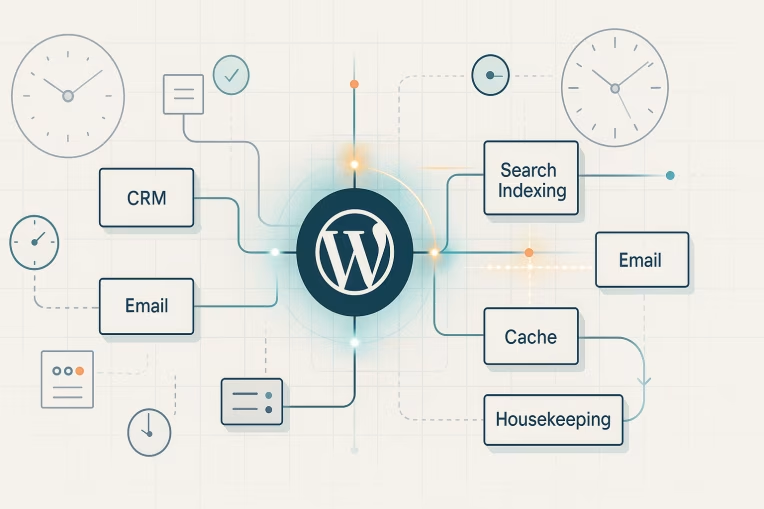
Enterprise WordPress environments frequently depend on scheduled jobs to keep digital experiences and connected systems aligned. Content needs to be published on time. CRM records need to sync. Search indexes need refreshes. Feeds need regeneration. Caches need warming or invalidation. Old data needs cleanup.
All of that work can appear routine until it quietly stops happening.
That is why WordPress cron governance matters. This is not just a question of whether a technical mechanism fires. It is a broader architecture and operations concern: what business processes depend on scheduled execution, who owns them, how failures are detected, and how the platform recovers when work is delayed, duplicated, or missed.
For integration-heavy platforms, the real risk is often not a dramatic outage. It is drift. One system updates while another lags behind. A marketing workflow assumes data was synchronized, but it was not. Search results no longer reflect recent content changes. Time-based publishing appears inconsistent. Operational trust erodes because nobody can easily tell which jobs ran, which failed, and which are still stuck.
Why scheduled jobs become invisible platform risk
Scheduled jobs usually start life as implementation details. A plugin or custom feature needs recurring work, so a task is registered and forgotten. Over time, the platform accumulates dozens of these background dependencies across editorial workflows, integrations, performance tasks, and maintenance routines.
The problem is that scheduled work is easy to ignore when it is functioning well and hard to understand when it is not.
Several factors make the risk invisible:
- The business impact is often delayed rather than immediate.
- Failures may not be visible in the frontend experience at first.
- Ownership is frequently unclear across engineering, operations, marketing, and integration teams.
- Logs and alerts are often weaker for scheduled tasks than for user-facing requests.
- Teams may know WP-Cron exists, but not which workflows rely on it.
In enterprise WordPress operations, this creates a governance gap. Scheduled processes can become critical without being managed as critical. The result is a platform where background automation exists, but operational confidence does not.
Common enterprise dependencies on WP-Cron
WP-Cron is commonly used because it is built into WordPress and easy to adopt. It can be a reasonable execution model for many platform tasks, especially when work volume is moderate and timing tolerance is measured in minutes rather than seconds.
Typical enterprise dependencies include:
- CRM and marketing syncs: pushing form submissions, pulling lead or account updates, reconciling campaign metadata, or refreshing segmentation inputs.
- Cache invalidation and warming: clearing stale content after updates, prebuilding frequently visited pages, or staggering invalidation tasks after deployments.
- Search indexing: refreshing internal search records after content changes, rebuilding partial indexes, or cleaning orphaned entries.
- Email dispatch and notifications: sending digest emails, editorial alerts, or workflow reminders that do not need a user request to trigger them.
- Feed and data export generation: producing partner feeds, sitemap-adjacent outputs, product or listing exports, and syndication payloads.
- Cleanup and retention routines: pruning temporary files, deleting expired transient data, clearing stale locks, or enforcing content lifecycle rules.
- Publishing workflows: scheduled posts, embargo releases, and follow-up tasks tied to editorial timing.
None of these categories are unusual. What matters is recognizing that each one may represent a business process, not simply a background function. Once that shift is made, the need for cron observability and platform governance becomes much clearer.
Failure patterns: low traffic, lock contention, retries, duplicates, and long runners
WP-Cron is not inherently flawed, but it does have operational characteristics that teams need to understand.
Because WP-Cron is triggered by site activity rather than a true system scheduler by default, low or uneven traffic can delay execution. On a busy public site, that may be acceptable for many tasks. On internal, regional, gated, or low-traffic properties, it can become a direct source of timing drift.
Other failure patterns are just as important.
Low traffic and inconsistent triggering
If a task is scheduled for a specific time but no request hits the site near that moment, execution can be delayed. This matters most when:
- downstream systems expect regular synchronization windows
- publishing workflows are time-sensitive
- batches accumulate and make the next run heavier
- SLAs assume predictability that the trigger model cannot guarantee
The issue is not that WP-Cron never runs. It is that its timing may be insufficiently deterministic for some workloads.
Lock contention and concurrency issues
Scheduled tasks often interact with shared resources: options tables, queues, external APIs, caches, and content records. If one job is already running when another starts, contention can emerge.
This can lead to:
- delayed follow-on tasks
- partial updates
- stale locks that block future runs
- duplicated work when processes do not coordinate correctly
In integration-heavy environments, concurrency is rarely just a code quality concern. It is an operational design concern.
Retries without control
Many integrations need retry behavior because remote APIs can rate-limit, timeout, or temporarily fail. But unmanaged retries can create more noise than resilience.
Common problems include:
- repeated failures that never escalate to humans
- retries that overlap with the next scheduled run
- repeated writes to external systems without idempotency checks
- silent backlogs that grow until business users notice missing data
A retry strategy only helps when it is paired with visibility, bounded behavior, and clear ownership.
Duplicates and replay confusion
If a task is retriggered manually, retried automatically, or executed in overlapping windows, duplicate actions can occur. That might mean sending the same notification twice, generating conflicting feed states, or pushing the same record update multiple times.
This is especially important in WordPress integrations, where external systems may not tolerate ambiguity well. Reconciliation becomes harder when teams cannot answer a simple question: did the job run once, more than once, or not at all?
Long-running jobs
Some jobs begin as lightweight tasks and gradually become batch processors. As content volume grows or integrations multiply, what once completed quickly can start exceeding practical execution windows.
Long-running jobs can:
- hold locks longer than intended
- consume resources during peak traffic periods
- fail mid-batch and leave mixed state behind
- cause schedule pileups when the next run starts before the previous one finishes
A reliable scheduled job architecture usually favors smaller, observable units of work over opaque monoliths.
When to keep WP-Cron and when to move to system cron or external workers
A mature strategy does not assume that WP-Cron is always wrong. It asks whether the execution model fits the business requirement.
WP-Cron often remains appropriate when:
- timing can tolerate some delay
- job frequency is modest
- workloads are lightweight
- task volume is predictable
- the site receives enough traffic to trigger runs consistently
- the business impact of a delayed run is limited and recoverable
In these cases, improving WP-Cron reliability may be less about replacing it and more about governing it properly.
System cron or externally orchestrated execution may be better when:
- timing must be more deterministic
- platform traffic is inconsistent or low
- jobs are resource-intensive or long-running
- integrations have strict sequencing or dependency requirements
- operations teams need stronger control over execution windows
- missed runs materially affect reporting, campaigns, publishing, or downstream systems
External worker patterns may also make sense when workloads need queueing, isolation, or horizontal scaling. For example, generating large exports or processing high-volume sync batches is often better separated from frontend request lifecycles.
A useful decision framework is to score each scheduled process against four questions:
- How time-sensitive is it?
- How costly is delay or duplication?
- How heavy is the workload?
- How recoverable is failure?
If a job scores high on time sensitivity, business impact, and operational complexity, it may deserve system-level scheduling or worker-based execution rather than default WP-Cron triggering.
Monitoring and ownership for scheduled business processes
The most important improvement many teams can make is not architectural migration. It is basic operational ownership.
Every significant scheduled process should have a known owner, expected runtime pattern, and observable success criteria. That sounds simple, but it is often missing in enterprise WordPress operations because responsibilities are split across application teams, infrastructure teams, and business stakeholders.
At a minimum, teams should maintain an inventory of scheduled processes that includes:
- the business purpose of the job
- the technical trigger or schedule
- the systems touched
- expected frequency and duration
- success and failure signals
- the service owner or responding team
- recovery steps if the job is missed or partially completed
Monitoring should focus on business outcomes as well as execution attempts.
For example, it is not enough to know a sync job started. Teams also need to know whether records were actually transferred, whether the destination accepted them, whether the backlog is growing, and whether the platform is now out of alignment with an external system.
Useful observability patterns include:
- alerts on missed execution windows
- alerts on repeated failure counts
- tracking job duration over time
- visibility into queue depth or batch backlog where applicable
- structured logging with correlation across systems
- dashboards that distinguish success, partial success, retry, and hard failure
This is where WordPress platform governance becomes concrete. Governance is not a policy document alone. It is the combination of ownership, instrumentation, escalation paths, and periodic review.
Runbooks for missed jobs, replay, and reconciliation
Even well-designed scheduled systems will sometimes fail. What matters is whether recovery is improvised or prepared.
Runbooks should exist for the jobs that affect customer data, publishing, reporting, lead flow, or search visibility. These do not need to be overly complex, but they should answer the questions responders will actually ask under pressure.
A practical runbook should cover:
- how to confirm whether the job ran
- how to identify the last successful execution
- how to assess business impact
- whether manual replay is safe
- how to avoid duplicate downstream actions
- how to reconcile partial data states
- when to escalate to integration or infrastructure owners
For integration workflows, replay safety deserves special attention. Some processes can simply rerun the missed window. Others require deduplication rules, idempotent updates, or date-bounded reprocessing to avoid making the situation worse.
Reconciliation is also critical. If a CRM sync failed for six hours, recovery is not complete just because the next scheduled run succeeds. Teams may need to compare system states, backfill missing transactions, or validate that dependent automations did not proceed on incomplete data.
A sensible operating model is to classify jobs into recovery tiers:
- Tier 1: safe to rerun automatically with minimal risk
- Tier 2: safe to replay with validation steps
- Tier 3: requires coordinated review because duplicates or partial state can cause business issues
This classification helps technical and non-technical stakeholders align on response expectations before an incident occurs.
Governance checklist for growing WordPress teams
As platforms mature, scheduled work needs to move from hidden implementation detail to managed capability. The following checklist is a practical starting point for teams building stronger scheduled jobs WordPress governance:
- Create a central inventory of scheduled processes and their owners.
- Map each job to its business function, not just its technical label.
- Separate lightweight, delay-tolerant jobs from critical or heavy workloads.
- Define acceptable delay, retry behavior, and duplicate tolerance for each process.
- Review whether default WP-Cron triggering matches actual traffic patterns.
- Use system cron or external execution where timing or load requires stronger control.
- Add monitoring for missed windows, repeated failures, and abnormal duration.
- Ensure logs make it possible to trace a job across WordPress and external systems.
- Document replay and reconciliation procedures for high-impact jobs.
- Review scheduled processes during platform changes, migrations, and integration expansions.
This checklist is particularly useful during modernization efforts. Many enterprise teams improve frontend architecture, hosting, or deployment workflows while leaving background automation largely unchanged. That can create a mismatch where the visible platform evolves, but operational reliability does not.
Closing perspective
For enterprise WordPress teams, the right question is not whether WP-Cron is good or bad. The better question is whether scheduled business processes are being governed with the same discipline applied to deployments, integrations, and user-facing performance.
WP-Cron can be entirely reasonable for the right workloads. But when scheduled jobs support CRM sync, search freshness, publishing, feed generation, cache behavior, or data hygiene, they deserve explicit ownership and observability.
Silent failure is rarely silent for long. It shows up as workflow drift, inconsistent data, confusing reports, delayed content operations, or reduced trust in the platform.
Teams that treat scheduled work as part of platform architecture rather than background plumbing are usually better positioned to choose the right execution model, detect failure sooner, and recover with far less business disruption. That is the core of effective WordPress cron governance.
Tags: WordPress, WordPress cron governance, WP-Cron reliability, enterprise WordPress operations, WordPress integrations, cron observability, WordPress platform governance