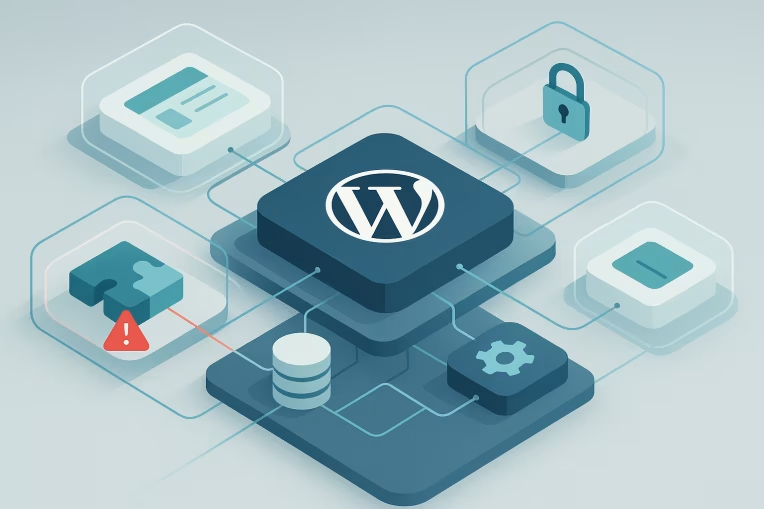
Enterprise teams often adopt multisite for good reasons: centralized upgrades, shared platform standards, lower operational overhead, and faster rollout of common capabilities. None of those benefits are inherently at odds with strong isolation. The problem starts when shared infrastructure is mistaken for isolated tenancy by default.
In WordPress multisite, each site can feel separate at the content and publishing layer while still depending on deeply shared code, permissions, network settings, infrastructure, and delivery processes. That means one site's change can sometimes alter another site's behavior without crossing an obvious line like direct database access or visible content edits.
A WordPress multisite tenant isolation audit is not just a security exercise. It is an architecture review, an operational review, and a release-confidence exercise. The goal is to understand which boundaries are real, which are weak, and which are only assumed.
Why multisite centralization does not guarantee safe isolation
Multisite centralizes administration, but centralization is not the same thing as containment.
At the WordPress layer, sites in a network typically share:
- the same WordPress core
- the same plugin codebase
- the same theme codebase or parent theme logic
- the same deployment pipeline
- overlapping user identity models
- portions of the same cache and infrastructure stack
Even when the database uses site-specific table prefixes for content tables, the operational reality is still shared. A plugin update activated for one use case can change global behavior. A capability mapping decision can overexpose tools to the wrong actors. A cache rule written for performance can accidentally mix responses between tenants. A domain mapping change can alter routing or cookies in ways that affect multiple sites.
This is why enterprise WordPress multisite architecture needs a more precise question than "Is the network secure?" A better question is: what kinds of actions on one site can influence another site, through which mechanisms, and with what level of detectability?
That framing helps teams move from generic confidence to testable isolation assumptions.
Isolation surfaces: code, roles, media, cache, domains, and integrations
A useful tenant isolation audit starts by mapping the surfaces where cross-site influence can occur.
Shared code paths
The most common isolation weakness in multisite is not malicious behavior. It is shared application logic.
Examples include:
- plugins that store options at the network level when teams assume site-level behavior
- themes that use global configuration, shared assets, or conditional logic spanning multiple sites
- custom mu-plugins that apply filters or redirects across the network
- plugin updates that introduce settings or schema changes affecting all sites that load the code
In enterprise environments, this matters because teams often govern content separately while engineering ships from one shared repository. A business unit can believe it owns only its site, while the code powering its experience is still coupled to others.
Roles and capability boundaries
WordPress multisite has a real distinction between site admins and super admins, but custom capability models can blur that line.
Audit questions here include:
- Which roles exist per site versus network-wide?
- Do any plugins elevate permissions beyond intended scope?
- Can site-level administrators install functionality indirectly through approved tools, settings imports, or integration configuration?
- Are there custom dashboards or admin menus exposing network-relevant settings at the site layer?
Capability drift is especially common when platforms evolve over time. A role model that made sense for ten sites can become risky at one hundred, especially when multiple teams, agencies, or regional operators are involved.
Media and upload handling
Uploads may appear isolated because files are organized per site, but implementation details matter.
Review:
- how media paths are generated
- whether object storage policies are scoped per site or broadly per environment
- whether image transformation, CDN rewrites, or asset proxying preserve isolation
- whether one site's large or malformed assets can affect shared storage, image processing queues, or CDN cache behavior
The issue is often operational rather than dramatic. A weak storage policy or shared transformation layer can widen blast radius during incidents or make troubleshooting ambiguous.
Cache behavior
Multisite cache isolation is a frequent blind spot.
Page cache, object cache, CDN layers, reverse proxies, and edge logic must all distinguish sites correctly. In principle this seems straightforward. In practice, bleed can happen through:
- cache keys that do not include host or site identifiers consistently
- shared object cache groups with weak namespacing
- purge logic that invalidates too broadly or not broadly enough
- preview, login, personalization, or geolocation rules applied network-wide
- edge redirects or rewrites built for one domain but executed before tenant-specific routing is resolved
Cache problems are not always obvious content leaks. They can also manifest as inconsistent permissions, stale headers, broken login flows, or one site's performance tuning degrading another's behavior.
Domain and cookie boundaries
Domain mapping introduces another layer of isolation concerns.
Review how the network handles:
- canonical domain enforcement
- cross-domain redirects
- cookie scope and authentication behavior
- environment-specific hostnames
- preview or staging subdomains
A seemingly minor configuration decision can cause users to land on the wrong host, carry unexpected session behavior, or trigger conflicting security policies. These are often infrastructure-plus-application issues, which is why they are easy to miss when audits are limited to plugin inventories or role reviews.
External integrations
Integrations frequently cross tenant boundaries long before teams notice.
Examples include:
- analytics or tag management containers reused across sites without clear ownership
- CRM, search, or personalization services configured with shared API credentials
- form handlers or webhook destinations that route multiple sites into the same downstream workflow
- third-party search indexes mixing content sources unexpectedly
The risk is not always exposure of sensitive data. Sometimes it is governance confusion: teams assume their site is autonomous, but integrations route events into shared systems with shared consequences.
Common leak paths in enterprise multisite networks
Most enterprise multisite issues emerge through repeatable patterns rather than exotic edge cases.
Shared plugin risk that behaves globally
A plugin may be activated selectively, but its code can still load in shared contexts, register hooks broadly, or write network-level configuration. If teams do not test upgrade behavior across tenant types, one site's feature adoption can create regressions elsewhere.
This is one reason shared plugin risk deserves explicit audit attention. The question is not simply whether a plugin is approved. It is whether its lifecycle, configuration model, and runtime behavior respect site boundaries.
Capability misconfiguration through convenience
Temporary access often becomes permanent. A support role gets elevated for troubleshooting. A site admin receives broader rights to reduce ticket volume. A custom tool bypasses core assumptions because it is easier to operate.
None of these decisions look severe in isolation. Over time, however, they can create cross-site pathways that are not reflected in documentation or onboarding.
Network-wide theme logic with per-site exceptions
Enterprise design systems often rely on shared themes with feature flags, site options, and conditional rendering rules. This is efficient, but it can also create hidden coupling.
If a site's exception requires custom logic in a shared theme, the boundary is no longer purely tenant-level. It becomes code-level. That means regression testing for one tenant should now consider the others that rely on the same execution path.
Cache and CDN configuration drift
Performance teams may tune caching centrally while site teams change routing, content models, or personalization settings locally. Without a consistent isolation model, those decisions can drift apart.
The result may be subtle:
- authenticated pages cached too broadly
- site-specific headers reused on another domain
- purge jobs removing content for unrelated sites
- edge rules interfering with mapped domains
Shared operational environments
Staging, QA, and production-like environments can weaken isolation even when production is relatively well controlled. Cloned databases, reused credentials, shared test domains, and broad access for vendors can create poor habits that later influence production changes.
A strong tenant isolation audit looks beyond runtime architecture and includes how teams build, test, and promote changes.
How to run a tenant isolation audit without treating it as only a security review
The best tenant isolation audit approach is cross-functional. Security should be involved, but the audit should also include platform engineering, WordPress specialists, DevOps, and stakeholders who understand editorial and operational workflows.
A practical sequence looks like this.
1. Define the intended tenant model
Start by documenting what separation the network is supposed to provide.
For example:
- Are sites merely brand variations on a shared platform?
- Are they business-unit properties with separate ownership and release expectations?
- Are some tenants subject to stricter regulatory or contractual handling than others?
Isolation can only be audited against declared intent. If the platform is designed for partial sharing, that is acceptable, but it should be explicit.
2. Inventory shared versus site-scoped components
Map the major assets and controls:
- plugins and mu-plugins
- themes and child themes
- role definitions
- network settings
- object storage and upload paths
- cache tiers and keying rules
- domains, certificates, and routing rules
- CI/CD pipelines
- integration credentials and event flows
This inventory should distinguish between what is technically shared and what teams only assume is local.
3. Trace cross-site influence paths
For each shared component, ask:
- Can a change on Site A alter runtime behavior on Site B?
- Can a permission on Site A expose network-relevant control?
- Can an operational failure on Site A degrade Site B?
- Would the effect be visible immediately, or only under specific traffic, cache, or integration conditions?
This exercise often reveals that the most important boundaries are not content boundaries. They are change boundaries.
4. Review actual implementation, not just documented policy
Many enterprise networks have good governance documents and weaker technical enforcement. Audit the code and configuration that run today.
Useful review points include:
- plugin bootstrap logic
- custom capability filters
- network option usage
- cache namespace configuration
- domain mapping and redirect rules
- shared secrets management
- deployment promotion controls
Where possible, verify through environment inspection and test scenarios rather than relying on architecture diagrams alone.
5. Test representative failure modes
You do not need to simulate a breach to learn useful things. Safe, operational test cases are often enough.
Examples:
- update a shared plugin in a lower environment and compare behavior across multiple tenant types
- validate whether cache keys differ correctly by host and authentication state
- confirm whether a site admin can reach settings that affect network-level behavior
- test whether integration events are tagged and routed by site as expected
- verify whether media URLs, storage policies, and purge routines stay site-scoped
The goal is not drama. It is confidence in boundary behavior.
6. Classify findings by blast radius and remediation path
Not every issue requires architectural separation. Some require configuration fixes, role tightening, plugin replacement, or better deployment controls.
A useful classification scheme can include:
- local defect: impacts one site only
- shared-path defect: caused by shared logic but manageable within the network
- boundary weakness: tenant separation exists but is inconsistently enforced
- structural limitation: the network model cannot meet the intended isolation requirement without major redesign or split
This framing helps teams make proportionate decisions.
Deciding when to harden the network versus split sites apart
A multisite network is not automatically the wrong choice because isolation is imperfect. The decision depends on the kind of separation the organization needs.
Hardening the network is often appropriate when:
- sites share the same platform roadmap
- branding and content vary more than application behavior
- release coordination is acceptable
- most risks come from fixable cache, role, or configuration issues
- governance maturity is high enough to manage shared components deliberately
Splitting sites apart becomes more reasonable when:
- tenants require materially different plugin stacks or deployment cadences
- some sites need stricter access and integration controls than others
- business ownership models conflict with shared release authority
- exception handling in themes or plugins has become pervasive
- the cost of proving isolation repeatedly exceeds the efficiency gained from sharing
The key is to compare operating model fit, not only technology preference. In some cases, the right answer is a hybrid: keep a core multisite platform for closely aligned properties and separate out high-variance or high-sensitivity sites.
Governance controls for plugin intake, super admin use, and per-site exceptions
A good audit should lead to better ongoing controls, not just a one-time findings list.
Plugin intake controls
For shared plugins and platform extensions, define a lightweight but real review model:
- scope of runtime impact
- use of network options versus site options
- capability changes
- cache implications
- integration and webhook behavior
- rollback and compatibility expectations
This is especially important in enterprise WordPress multisite where operational speed can otherwise normalize broad coupling. Teams formalizing these controls often benefit from a clearer WordPress multisite strategy so plugin and theme lifecycle decisions align with tenancy intent.
Super admin controls
Super admin access is powerful by design. The audit should confirm:
- who has it
- why they have it
- how it is approved
- how it is monitored
- whether break-glass use is distinguished from routine administration
Too many multisite networks treat super admin as a convenience layer. In practice, it is a central boundary control and should be governed accordingly.
Per-site exception management
Exceptions are often where isolation erodes.
Track exceptions such as:
- tenant-specific theme overrides
- special cache bypass rules
- custom integration credentials
- domain-specific redirect logic
- unique role or editorial workflow requirements
Exceptions are not inherently bad. They simply need visibility. Once exception volume grows, it becomes easier to identify when the shared model is no longer cleanly serving the network.
Audit outputs that improve release confidence and incident containment
A strong audit produces artifacts that teams can actually use.
Useful outputs include:
- a boundary map of shared and site-scoped components
- a catalog of cross-site influence paths
- a risk-ranked findings list tied to blast radius
- remediation recommendations split into quick fixes, platform backlog items, and structural decisions
- test cases for regression suites covering cache, permissions, domain routing, and integrations
- governance updates for plugin intake, role management, and exception approval
These outputs help in two important ways.
First, they improve release confidence. Teams gain a clearer view of which changes require broader testing and which can remain site-scoped.
Second, they improve incident containment. When something goes wrong, responders can tell more quickly whether they are dealing with a local issue, a shared service problem, or a true tenant-boundary failure.
WordPress multisite remains a viable enterprise pattern when its tradeoffs are understood. The goal is not to eliminate all sharing. The goal is to make shared efficiency intentional and isolation boundaries explicit.
When teams audit those boundaries across code, roles, media, cache, domains, integrations, and operational workflows, they move from assumption-driven confidence to architecture-level clarity. That is what makes multisite more governable, more supportable, and more resilient as the network grows. For organizations turning those findings into implementation changes, WordPress Multisite Architecture work is often where tenant boundaries, shared plugin strategy, and cache or domain decisions become enforceable. A modernization example with similar governance and maintainability goals can be seen in SunAuto.
Tags: WordPress, WordPress multisite, Enterprise architecture, Security, Platform governance, DevOps