Enterprise teams often treat single sign-on as an obvious upgrade: one identity provider, one login experience, fewer passwords, and cleaner governance. In the right places, that is true.
But on large WordPress estates, SSO can become over-scoped. A platform may include a public marketing site, editorial administration, gated resources, partner-only content, microsites, headless frontends, CRM-connected forms, support links, and analytics or personalization tooling. Those surfaces may sit on the same platform, yet they rarely share the same trust model.
That distinction matters. When teams extend SSO everywhere by default, they can create unnecessary coupling between identity, authorization, session behavior, integrations, and support operations. The result is often a more fragile platform, not a more secure one.
A better approach is to define where shared identity genuinely adds value and where local, scoped, or separate access patterns are safer and easier to operate.
Why WordPress SSO becomes over-scoped in enterprise programs
Over-scoping usually does not happen because teams misunderstand authentication. It happens because enterprise programs optimize for standardization.
A few common drivers push programs toward blanket SSO:
- security teams want centralized control and auditability
- architecture teams want fewer identity patterns to maintain
- stakeholders assume a unified login always improves user experience
- delivery teams want to avoid multiple access models across one platform
- procurement or governance groups prefer a single enterprise standard
Those goals are reasonable. The problem is that they can flatten meaningful differences between audiences and use cases.
A public content site does not carry the same risk profile as WordPress admin access. A partner portal does not behave like a gated whitepaper download flow. A multisite network serving regional brands may share infrastructure without sharing the same authorization rules. A headless-ready estate may use WordPress as an editorial system while customer-facing identity lives elsewhere entirely.
In those cases, the question is not simply whether WordPress should support SSO. The better question is: which parts of the experience platform should trust the same identity boundary, for which users, and under whose operational ownership?
Which surfaces should and should not share the same identity boundary
Enterprise WordPress environments usually contain multiple surface types. Treating them as one identity domain often hides risk.
Surfaces that often justify enterprise SSO include:
- WordPress admin access for editors, publishers, and administrators
- internal publishing tools connected to approval workflows
- employee-only microsites or intranet-like content areas
- partner portals where account lifecycle is managed through enterprise processes
- back-office interfaces that depend on corporate identity controls
Surfaces that may not justify the same SSO boundary include:
- fully public marketing and brand sites
- simple gated resource libraries used for lead generation
- campaign landing pages with temporary lifecycle needs
- customer-facing experiences where identity is owned by another application stack
- low-risk forms or content journeys that do not require persistent authenticated sessions
This does not mean local authentication is always preferable. It means identity scope should follow business risk, user type, session expectations, and operational ownership.
A useful rule is to separate authentication convenience from authorization consequences. Shared login may feel elegant, but if it grants broad role assumptions, complicates logout behavior, or ties public experience uptime to corporate identity availability, the cost can outweigh the benefit.
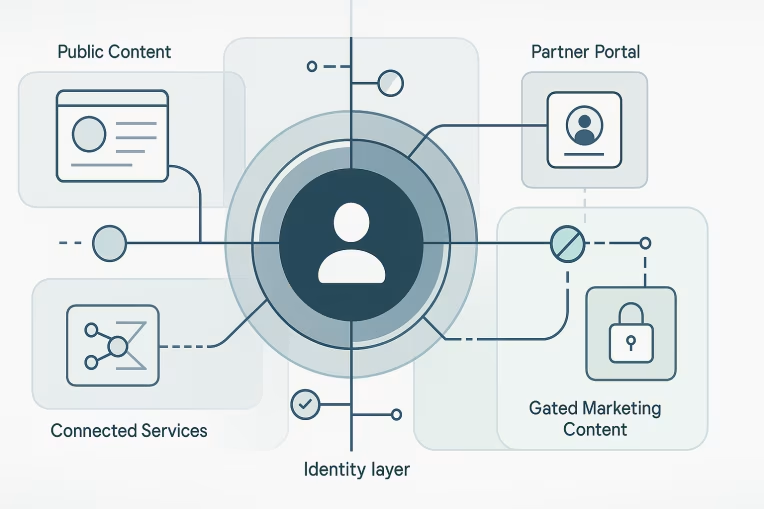
Public content, editorial admin, partner areas, and gated marketing flows compared
A practical boundary model starts by comparing surfaces directly.
Public content
Public content generally should remain public. Requiring SSO for basic content access usually adds friction, creates SEO and discoverability constraints, and introduces unnecessary reliance on external identity infrastructure.
For most enterprise marketing estates, public pages should not inherit the same identity assumptions as restricted environments simply because they share WordPress infrastructure.
Editorial admin
Editorial admin is often the clearest case for enterprise SSO.
Editors are known users. They usually belong to a managed workforce or approved agency group. Access benefits from centralized identity lifecycle controls such as joiner-mover-leaver processes, MFA enforcement, and conditional access policies.
Even here, SSO should not be the whole design. Teams also need:
- least-privilege WordPress roles
- explicit admin path restrictions
- strong mapping between identity claims and WordPress capabilities
- emergency access procedures if the IdP is unavailable
- clear audit ownership for failed access and privilege disputes
Partner areas
Partner areas are more nuanced. Some organizations manage partner identities centrally; others federate trust to external organizations; others provision local accounts with additional controls.
SSO can work well for partners when lifecycle governance, contractual obligations, and support ownership are defined. It can work poorly when partners span multiple organizations, inconsistent directories, or weak entitlement processes.
The key question is whether the organization can trust upstream identity data enough to drive authorization decisions in WordPress and any connected applications.
Gated marketing flows
Gated content often gets pulled into enterprise SSO without enough scrutiny.
If a whitepaper library, webinar archive, or event registration area exists mainly to capture or qualify leads, enterprise SSO can create friction and distort the purpose of the flow. Marketing teams may lose flexibility, and users may face login expectations that do not match the value exchange.
In some cases, a lightweight registration model or application-specific identity layer is more appropriate than forcing enterprise-wide SSO onto a low-trust, low-persistence marketing journey.
Role mapping, group claims, and authorization drift inside WordPress
Authentication answers who a user is. Authorization decides what they can do. In enterprise WordPress, authorization is where many SSO designs become fragile.
A common failure pattern looks like this:
- the IdP sends group or role claims
- WordPress maps those claims to local roles or capabilities
- the original mapping is documented loosely or only in plugin settings
- business teams add exceptions over time
- local users, custom roles, multisite differences, or integration logic drift away from the intended model
Eventually, the platform appears centralized while actual access control becomes inconsistent.
This is especially common in multisite and composable environments, where one identity source feeds multiple sites, environments, or applications with different permission needs.
To reduce authorization drift, teams should define:
- which claims are authoritative for access decisions
- how claims map to WordPress roles and capabilities
- whether mapping occurs globally, per site, or per application surface
- how exceptions are approved and documented
- how deprovisioning works when claims change or disappear
- how local WordPress roles are prevented from bypassing governance
It also helps to distinguish between coarse access and fine-grained privilege.
For example, an upstream claim may determine whether someone can access the editorial environment at all. Once inside WordPress, a narrower role model should still govern capabilities such as publishing, user management, taxonomy control, or settings access.
That separation prevents the IdP from becoming an overly blunt authorization tool while preserving centralized identity control.
Session lifetime, logout behavior, and cross-application trust assumptions
SSO discussions often focus on login. Operational pain usually shows up in session behavior.
Enterprise WordPress estates may involve multiple session layers:
- the IdP session
- the WordPress session
- reverse proxy or edge session behavior
- sessions in downstream applications reached from the WordPress experience
- browser persistence across subdomains or related applications
If those layers are not designed intentionally, users can encounter confusing or risky outcomes. For example:
- logging out of WordPress does not terminate the upstream IdP session
- logging out of one property unexpectedly signs the user out of unrelated tools
- short IdP session lifetimes disrupt long-form editorial work
- persistent sessions on shared devices create residual access risk
- embedded or linked applications assume trust based on partial session context
This is where cross-application trust assumptions matter. Just because two experiences use the same identity provider does not mean they should behave as one session domain.
Teams should define, before rollout:
- session lifetime by user type and surface
- idle timeout expectations for editors, partners, and external users
- whether logout is local, federated, or tiered by application
- how reauthentication is triggered for sensitive actions
- what happens when identity services are degraded
- whether session behavior aligns with privacy, support, and usability expectations
For editorial users, longer sessions with step-up authentication for privileged actions may be reasonable. For partner areas, stricter timeout and explicit logout behavior may be appropriate. For low-friction marketing flows, persistent enterprise sessions may be unnecessary and even counterproductive.
Integration side effects for CRM, analytics, personalization, and support workflows
SSO choices do not stop at access control. They influence adjacent systems across the platform.
CRM and lead workflows
When gated content is tied to CRM capture, introducing SSO can change what data is collected, when consent is captured, and how contacts are matched. Teams may assume that identity centralization improves data quality, but it can also remove useful checkpoints or complicate attribution.
Analytics
Authenticated states alter measurement strategy. Public and logged-in journeys may need different analytics treatment, identity stitching rules, and reporting expectations. If SSO is introduced without analytics alignment, teams can lose clarity on funnel behavior and audience segmentation.
Personalization
Shared identity can improve audience recognition across properties, but only if profile usage, data governance, and entitlement logic are consistent. Otherwise, identity-linked personalization may expose irrelevant or restricted experiences based on incomplete authorization context.
Support workflows
Every new SSO boundary creates support implications:
- who handles failed login issues
- who validates authorization disputes
- who can bypass access in emergencies
- who owns partner onboarding errors
- who diagnoses whether the problem sits in WordPress, the IdP, a claims mapping layer, or another connected application
A design that looks elegant on a diagram can become expensive if support ownership is fragmented.
Decision framework for choosing scoped SSO instead of blanket SSO
A practical decision framework helps teams avoid ideology. Instead of asking whether WordPress should use SSO, evaluate each surface against a consistent set of questions.
1. What is the user population?
Identify whether users are employees, agencies, partners, customers, prospects, or anonymous visitors. Different populations usually require different lifecycle and trust models.
2. Who owns identity lifecycle?
If account creation, role change, and deprovisioning are not clearly owned, centralizing authentication may only centralize confusion.
3. What is the risk of improper access?
Assess the impact of exposure. Unauthorized editorial admin access is fundamentally different from access to a low-risk gated content area.
4. What experience benefit does shared login actually create?
Be specific. Does SSO remove repeated login for known partner users? Or is it being added to a mostly anonymous journey where it introduces friction without meaningful value?
5. How stable is authorization data upstream?
If group claims are inconsistent, delayed, or too coarse, WordPress role mapping will become brittle.
6. What session behavior is acceptable?
Decide whether users need short-lived sessions, persistent sessions, federated logout, or isolated application sessions.
7. What integrations inherit the decision?
Map impacts to CRM, analytics, personalization, consent, support tooling, and connected applications.
8. Who owns incidents and exceptions?
Every boundary needs named owners for policy decisions, access exceptions, and outage response.
When several of those answers differ by surface, that is a strong sign the platform needs scoped SSO boundaries, not blanket SSO.
Governance checklist for rollout, review, and incident ownership
Once boundaries are defined, governance determines whether the model stays healthy.
Use a rollout checklist like this:
- document each WordPress surface and its intended trust boundary
- define the authoritative identity source for each user population
- specify claim-to-role mapping and approval ownership
- separate authentication design from capability-level authorization
- confirm session lifetime, timeout, and logout behavior per surface
- document break-glass and recovery procedures
- align CRM, analytics, personalization, and support teams on downstream effects
- review multisite or environment-specific exceptions explicitly
- establish access review cadence and deprovisioning checks
- assign incident ownership across WordPress, identity, and integration layers
Periodic review is just as important as initial implementation. Enterprise platforms change. New microsites launch. Partner programs expand. Editorial teams reorganize. Headless components get added. A once-reasonable SSO boundary can become inappropriate as the estate evolves.
That is why governance should focus on operating model, not only technical setup. Plugin selection, protocol choice, and integration mechanics matter, but they are downstream of the more important decision: what should trust what, and why?
Final perspective
In enterprise WordPress environments, SSO is not a badge of maturity on its own. Good WordPress SSO architecture is about scope, trust, and operational clarity.
Shared identity often makes sense for editorial administration and controlled internal or partner experiences. It often makes less sense for public content and some marketing-led gated journeys. Between those extremes, the right answer depends on user population, authorization quality, session expectations, and the systems that inherit the decision.
Teams that define those boundaries deliberately usually end up with a platform that is easier to secure, easier to support, and easier to evolve. That kind of outcome usually depends on clear enterprise WordPress architecture, disciplined WordPress security, and platform governance patterns similar to SunAuto WordPress Platform Modernization.
Teams that centralize everything behind one login model often discover that consistency at the identity layer can hide inconsistency everywhere else.
The goal is not to avoid SSO. The goal is to apply it where shared identity creates real value, and to stop where it starts creating more risk, coupling, and operational drag than the platform actually needs.
Tags: WordPress, WordPress SSO architecture, Enterprise architecture, Security, Identity and access management, DXP