Teams usually notice metadata problems late.
At first, the component library seems healthy: components exist in code, stories are published, design references are available, and the CMS exposes reusable building blocks to editors. But over time, the same component starts to appear under different names, different labels, and different assumptions depending on where someone encounters it.
A frontend team might call something a "Promo Card." Designers may label the same pattern "Campaign Tile." In Storybook it may sit under a generic content category. In the CMS picker it may be grouped by page region. Internal search might surface all three names, or none of them reliably. Documentation may describe one use case, while editorial teams are trying to solve another.
This is not only a documentation quality issue. It is a governance problem.
When component metadata drifts, discoverability declines. Editorial teams choose the wrong building blocks or request duplicates. Delivery teams spend time translating between naming systems. Documentation becomes harder to maintain because it reflects multiple truths at once. The design system remains technically present, but operationally inconsistent.
For enterprise software organizations, this matters even more. Multiple products, brands, and content teams often share a common platform foundation. The challenge is not simply building reusable components. It is ensuring that the metadata surrounding those components stays coherent across the places where different teams find, evaluate, and use them.
The hidden metadata layer behind reusable components
Most design system conversations focus on visual consistency, API design, accessibility, and release management. Those are all important. But between the component itself and the people trying to use it sits another layer: metadata.
Component metadata includes the labels, descriptions, categories, statuses, tags, ownership markers, compatibility notes, and usage constraints that help people understand what a component is and when to use it.
That layer affects several real workflows:
- how developers browse Storybook or documentation catalogs
- how designers map a component to a pattern in design files
- how editors choose modules in a CMS component picker
- how search indexes surface reusable building blocks
- how governance teams review new component proposals
Without a managed metadata layer, organizations often end up with components that are technically reusable but practically hard to find and hard to trust.
The key issue is that each platform tends to impose its own organizational logic. Storybook favors code-oriented grouping. Design files may reflect visual or layout thinking. CMS authoring tools prioritize editorial tasks. Internal search depends on indexed terms and aliases. Documentation systems often mirror whatever structure was easiest to publish first.
If no shared model sits above those systems, they drift apart naturally.
How naming drift appears across Storybook, Figma, code, and CMS authoring
Naming drift rarely comes from a single bad decision. It usually accumulates through local optimization.
A component gets introduced by engineers with a code-friendly name. Later, a design team renames the visible pattern to reflect business language. Then the CMS team chooses a more instructional label to help editors. Search indexes inherit partial metadata from one source but not the others. Documentation writers add explanatory terms that never get normalized anywhere else.
None of these choices is unreasonable on its own. Together, they create fragmentation.
Common forms of drift include:
- Name drift: one component has different primary names in code, design files, documentation, and CMS UI.
- Category drift: the same component appears under layout, content, marketing, or navigation depending on the system.
- Status drift: Storybook marks a component as ready, while CMS teams still treat it as limited or pilot-only.
- Usage drift: documentation describes broad applicability, but editorial tools lack warnings about constraints.
- Alias drift: legacy names remain in active use, but there is no governed synonym model.
In enterprise settings, drift often increases during platform expansion:
- a second brand adopts the same component with slightly different labels
- a new product area introduces domain-specific terminology
- multiple CMS instances expose similar libraries with separate taxonomies
- local teams add picker help text that is never reconciled upstream
The result is a system that looks unified from a distance but behaves inconsistently in day-to-day delivery.
This is where teams often misdiagnose the problem. They may assume users need better training, more documentation, or stricter approval gates. Sometimes those help. But if the metadata model itself is weak, the same confusion will keep resurfacing in every interface that depends on it.
Metadata fields that actually matter: status, intent, constraints, ownership, compatibility
Not every metadata field deserves equal governance effort. Teams can overcomplicate the problem by creating large schemas that nobody maintains.
A more useful approach is to define a compact component metadata model that supports the actual decisions users need to make.
At minimum, a strong enterprise metadata model often includes the following fields.
1. Primary name
This is the canonical component name used across systems wherever possible.
It should be:
- stable enough to govern over time
- understandable outside the originating team
- specific enough to distinguish the component from nearby patterns
The canonical name does not need to match the code identifier exactly, but the relationship between the two should be explicit.
2. Aliases and synonyms
These capture alternative names, legacy labels, and common search terms.
This field is essential because users do not all think in the same vocabulary. Designers, engineers, and editors often arrive with different mental models. A governed alias model helps search and migration without forcing every interface to expose every historical label equally.
3. Intent or purpose
This explains what problem the component is meant to solve.
Good intent metadata is more useful than a generic description. For example, "Used to highlight a promoted content item with image, title, and call to action" is more actionable than "A card component."
Intent helps distinguish similar components that may look related but serve different content or interaction needs.
4. Status
Status should reflect operational readiness, not just code existence.
Typical status concepts may include active, limited, deprecated, internal-only, or under review. The exact vocabulary can vary, but it should be consistent across Storybook, documentation, and CMS authoring.
If one system uses "stable" while another uses "approved" and a third uses "production ready," users have to interpret governance policy instead of consuming it.
5. Constraints
Constraints define where the component should not be used, or what conditions must be true before use.
Examples include:
- only available for certain content types
- restricted to specific page templates or channels
- unsuitable for transactional flows
- requires editorial image ratio support
- needs a companion data source or structured field set
Constraints are especially important in CMS contexts because editors often need quick guidance at the point of selection, not only long-form documentation elsewhere.
6. Ownership
Ownership identifies who governs the component and who approves changes.
That may include:
- platform team owner
- design system maintainer
- content model owner
- domain team steward
Ownership metadata becomes critical when questions arise about naming, retirement, compatibility, or proposed extensions.
7. Compatibility
In enterprise environments, a component may not be universally available.
Compatibility metadata can indicate support across:
- brands
- apps or product suites
- CMS implementations
- rendering environments
- localization requirements
This field prevents the common mistake of documenting a component as globally reusable when it is only operationally supported in some contexts.
8. Taxonomy classification
Classification is the governed way the component is grouped for browse and filter experiences.
This can include multiple dimensions, such as:
- functional type
- editorial purpose
- page role
- content complexity
- audience or domain relevance
The important point is that classification should be deliberate and shared, not whatever folder structure each system happened to start with.
Aligning editorial component pickers with frontend component libraries
One of the most persistent disconnects in enterprise design systems is between how developers browse components and how editors select them.
Storybook catalogs typically optimize for implementation understanding. Editors need task-oriented decision support. They are trying to answer questions like:
- What am I trying to publish?
- Which component supports that intent?
- What are the constraints?
- Which option is recommended?
- Which similar option should I avoid?
Those are not the same as code browsing questions.
This does not mean the CMS picker should invent its own taxonomy from scratch. It means the shared metadata model should support different presentations for different users.
A practical pattern is to separate core metadata from channel-specific labels.
For example:
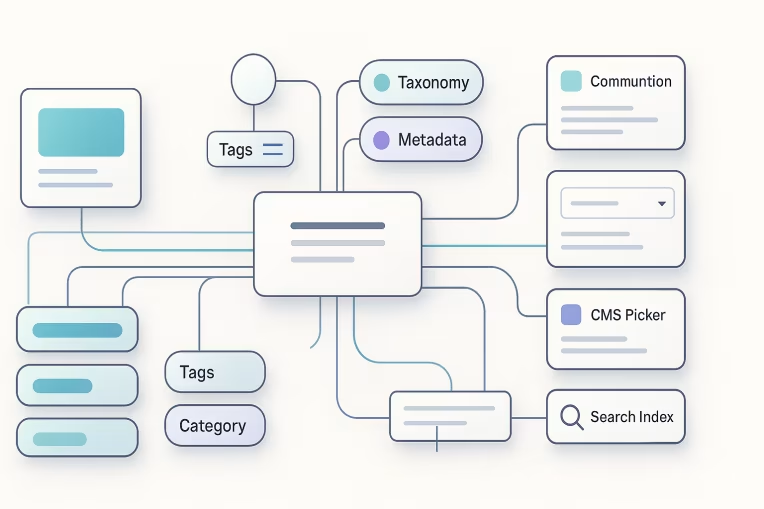
- the canonical component record defines name, aliases, status, intent, constraints, owner, and classification
- Storybook consumes the canonical record and maps it into engineering-oriented navigation
- the CMS picker consumes the same record but presents editorial labels, warnings, and examples suited to authoring workflows
- documentation surfaces the full guidance layer with links between conceptual and implementation views
- search indexes use both canonical names and aliases for retrieval
This keeps the underlying governance model unified while allowing different interfaces to remain useful to their audiences.
It also reduces the temptation for every consuming platform to create its own metadata fields independently.
A simple alignment test is this: if an editor selects a component in the CMS and later asks an engineer or designer for help, can all three parties identify the same component quickly using shared language? If not, the metadata model is not doing enough work.
Governance workflows for new components, aliases, and retirement
Metadata governance only works if it is embedded into change workflows.
If teams treat metadata as optional cleanup after implementation, drift will return. The operational question is not whether metadata matters. It is when teams are required to define and update it.
A useful governance workflow usually covers three lifecycle events.
New component introduction
When a new component is proposed, the review should include metadata decisions alongside API, accessibility, and implementation review.
That means agreeing on:
- canonical name
- aliases that should be searchable but not primary
- classification placement
- status at launch
- intended use cases
- known constraints
- owner and steward
- compatibility scope
This avoids the common pattern where code ships first and naming gets patched later in multiple downstream systems.
Alias and naming changes
Renaming is often unavoidable. Business terminology evolves. Product areas merge. Editorial teams surface clearer language.
The goal should not be to forbid renaming, but to govern it.
Useful controls include:
- preserving historical aliases for search continuity
- documenting why the primary name changed
- updating consuming systems from a shared source rather than manually in each tool
- defining which labels are canonical, display-oriented, or legacy
Without this, teams often experience silent divergence: a better name gets adopted in one place while the old name survives elsewhere indefinitely.
Component retirement and deprecation
Retirement governance should also include metadata updates.
A deprecated component needs more than a badge. It needs structured relationships that explain:
- whether it is blocked for new use
- which replacement component should be used instead
- whether content migration is required
- whether the legacy name should remain searchable for support purposes
This is especially important in CMS environments where old content may continue to reference historical components long after active development has moved on.
Measuring discoverability and reducing duplicate component requests
Organizations do not need a complex maturity framework to improve component discoverability. They need a few practical signals that reveal where metadata is failing users.
Good questions to ask include:
- Are users searching for terms that do not match canonical component names?
- Do support channels repeatedly explain the difference between similarly named components?
- Are editors requesting "new" modules that already exist under another label?
- Do teams create local documentation to compensate for unclear central classification?
- Are deprecated components still selected because replacements are hard to find?
Even lightweight review of these signals can reveal where naming, aliases, or taxonomy need attention.
Duplicate component requests are often a symptom of metadata failure rather than a genuine gap in the library. If people cannot discover an existing component confidently, they may conclude that the system lacks it.
To reduce that risk, teams can:
- maintain synonym coverage for common business and editorial language
- add short picker guidance that distinguishes nearby options
- make constraints visible before selection, not after implementation starts
- define replacement relationships for deprecated components
- review search terms and support tickets for vocabulary mismatch
The point is not to create exhaustive metadata administration overhead. It is to remove avoidable friction from component discovery and selection.
Practical implementation approach for enterprise teams
For many organizations, the most realistic next step is not a large governance program. It is a controlled normalization effort.
A pragmatic sequence often looks like this:
- Inventory current metadata sources. Identify where component names, statuses, tags, and descriptions currently live across Storybook, documentation, design references, CMS pickers, and search indexes.
- Define the canonical fields. Keep the model focused on the fields that affect discovery and safe use.
- Choose a source-of-truth pattern. This does not require a single tool for all experiences, but it does require one governed component record that downstream systems can consume.
- Map local labels to canonical metadata. Preserve necessary audience-specific wording without losing shared identity.
- Add lifecycle controls. New components, renames, and deprecations should trigger metadata review by default.
- Review discoverability regularly. Use search behavior, support pain points, and duplicate requests to refine aliases and taxonomy.
In enterprise settings, this work is often less about software complexity than organizational clarity. Teams need agreement on who owns the metadata model, who can change it, and how downstream consumers stay synchronized.
That ownership should be explicit. If metadata sits ambiguously between design, engineering, and content operations, it will usually be under-maintained by all three.
This kind of normalization work often overlaps with design system architecture, especially when component naming, documentation, and governance need to stay aligned across implementation and authoring environments.
It also frequently connects to taxonomy alignment when browse structures, aliases, and search labels need to remain coherent across CMS, documentation, and internal discovery tools.
Projects such as Arvesta show how component-driven delivery can benefit from a clearer source of truth across Storybook, CMS workflows, and shared UI governance.
Conclusion
Reusable components do not stay reusable just because they are published in a library. They stay reusable when people can find them, understand them, trust their status, and apply them in the right contexts.
That is why component metadata deserves to be treated as a governance layer of the design system, not as supporting polish.
When canonical names, aliases, classifications, status markers, constraints, and ownership are aligned across Storybook, design references, CMS authoring tools, documentation, and search, the system becomes easier to navigate for every audience. Editors make better choices. Engineers spend less time translating terminology. Governance teams reduce accidental duplication. The design system becomes more operationally coherent across products and brands.
In enterprise delivery, that coherence is valuable. Not because metadata is glamorous, but because it quietly determines whether a shared component ecosystem feels usable at scale.
Tags: Design Systems, Enterprise Software, Storybook Governance, CMS Architecture, Component Taxonomy, Documentation Operations