In enterprise frontend environments, third-party UI components usually arrive through a familiar path: a product team needs a date picker, rich text editor, chart, grid, or file upload flow, and an external package appears to solve the problem faster than building from scratch. In isolation, that can be a reasonable choice. At platform scale, repeated convenience decisions can produce a fragmented dependency landscape that is difficult to theme, difficult to upgrade, and difficult to govern.
That is why mature design systems need more than a list of approved packages. They need an intake model that helps teams make consistent decisions about when to adopt a dependency directly, when to wrap it behind internal contracts, when a fork may be justified, and when rejection is the safest path.
The goal is not to ban external components. It is to preserve local control over accessibility, branding, versioning, performance, and long-term maintainability while still allowing teams to move at a practical pace.
Why third-party components become platform debt
Most third-party UI packages are built to be broadly useful, not to fit the operating model of a specific enterprise platform. The mismatch is rarely obvious on day one. It usually emerges over time.
A component can look productive early and still become expensive later because it introduces one or more forms of hidden platform debt:
- Accessibility debt when keyboard support, screen reader behavior, focus management, or error semantics do not meet the standard your organization needs.
- Theming debt when styling hooks are too limited, too brittle, or too tied to a specific CSS approach.
- API debt when a component's props, events, or state model do not align with internal patterns and force teams into one-off adapters.
- Versioning debt when package updates are disruptive, infrequent, or coupled to unrelated libraries.
- Security and lifecycle risk when maintenance cadence slows, the maintainer model changes, or dependency chains grow opaque.
- Testing debt when behavior is difficult to automate reliably across browsers, locales, brands, or rendering modes.
These issues matter more in enterprise design systems because the blast radius is larger. A single problematic dependency can affect multiple products, brands, teams, and release trains. What looked like a local implementation detail can quickly become shared platform policy by accident.
A strong intake process prevents that accidental standardization.
The four decisions: adopt, wrap, fork, reject
A useful governance model should not collapse every decision into approved versus banned. In practice, design system teams usually need four outcomes.
1. Adopt
Adopt means the dependency is acceptable to use substantially as provided, with minimal internal abstraction.
This is most appropriate when:
- the component solves a non-differentiating problem well
- accessibility behavior is credible and testable
- theming requirements are straightforward
- the API fits the broader frontend architecture
- the package has a healthy maintenance profile
- replacement cost would likely exceed risk reduction
Direct adoption can be reasonable for narrower utilities or lower-surface-area components. It is less suitable for highly visible, heavily customized, or foundational UI primitives.
2. Wrap
Wrap means teams use the third-party dependency only through an internal design system component or adapter layer.
For most enterprise environments, this is the default answer for meaningful UI dependencies. Wrapping allows the organization to expose a stable internal contract while containing the volatility of the external package.
A wrapper can standardize:
- design tokens and theming inputs
- accessibility defaults and guardrails
- telemetry hooks
- localization behavior
- validation patterns
- test selectors and automation conventions
- deprecation handling when the underlying package changes
Wrapping adds some upfront work, but it often reduces the long-term cost of platform drift.
3. Fork
Fork means the organization creates and maintains its own derivative version of the dependency.
This should be treated as an exception, not a convenience mechanism for small preferences. A fork creates permanent ownership responsibilities: patch management, merge strategy, release management, documentation, testing, and eventually migration planning.
Forking is usually justified only when:
- the dependency is strategically important
- the gap is material, not cosmetic
- the upstream project is unlikely to address it in time
- replacing the component is impractical in the short term
- the organization is prepared to operate the fork as a product, not a side patch
4. Reject
Reject means the package should not enter the design system or shared platform path.
Common reasons include:
- unacceptable accessibility limitations
- an API model fundamentally at odds with internal architecture
- insufficient theming control for multi-brand use
- unresolvable performance concerns for target use cases
- poor maintenance signals or unclear roadmap health
- license terms that require formal review and cannot be approved for the intended use
- operational complexity that outweighs value
Rejection should be documented clearly. Otherwise the same package will be re-proposed repeatedly by different teams.
Intake criteria: accessibility, API fit, theming, performance, security, license, roadmap
The intake process works best when it uses explicit criteria rather than gut feel. The exact scoring model can vary, but the review dimensions should be stable enough that teams can predict what approval requires.
Accessibility
Accessibility should be one of the earliest filters, not a late-stage audit step.
Review criteria can include:
- keyboard navigation coverage
- focus visibility and focus trap behavior where applicable
- semantic output and ARIA usage
- screen reader behavior for common flows
- support for validation, errors, and helper content
- behavior under zoom and responsive reflow
- compatibility with reduced motion or high contrast expectations where relevant
It is important to distinguish between documented support and verified behavior. A package may claim accessibility coverage but still require substantial remediation work in real implementations.
API fit
A technically capable component can still be a poor platform fit if its API model fights the way your applications are built.
Look at questions such as:
- Does the component support controlled and uncontrolled usage in ways your teams expect?
- Does it compose well with form state, validation, and data fetching patterns?
- Does it align with SSR and hydration constraints common in React or Next.js applications?
- Does it force global side effects, singleton setup, or imperative lifecycle control that complicates reuse?
- Can you expose a simpler internal contract without leaking vendor-specific concepts into product code?
Poor API fit tends to spread quickly because application teams copy examples from each other. Once a difficult pattern becomes common, replacing it gets harder.
Theming and design token compatibility
Enterprise design systems often support multiple brands, products, or regional variants. A component that is easy to restyle for one team may still be a bad fit for a multi-brand platform.
Review:
- token-based styling support
- CSS override surface area
- ability to control density, spacing, typography, and states
- support for dark mode or alternate themes if relevant
- resilience of customization across upstream updates
If theming requires fragile selector overrides or DOM assumptions, the package is not truly design-system-friendly.
Performance
Performance evaluation should be tied to realistic usage, not just bundle size headlines.
Consider:
- package size and transitive dependency cost
- rendering behavior with large data sets or complex interactions
- lazy-loading options
- hydration impact in server-rendered applications
- responsiveness under frequent updates
- memory behavior for heavy widgets such as grids, charts, and editors
Not every component needs to be minimal, but the cost should be proportional to the problem it solves.
Security review criteria
Security review should be framed as governance input rather than a promise that a package is risk-free.
Typical review areas can include:
- dependency tree visibility
- update cadence and responsiveness to known issues
- use of unsafe HTML rendering paths or plugin ecosystems
- package provenance and release hygiene
- operational exposure created by optional integrations
For components like editors, markdown renderers, or file upload tools, the review often needs to go deeper because the risk surface is broader.
License and procurement considerations
License review is another decision input, not a formality to defer indefinitely.
Questions can include:
- Is the license compatible with the intended commercial use?
- Are there paid features or dual-licensing terms that could alter long-term cost or flexibility?
- Does the dependency introduce obligations that need legal or procurement review before adoption?
Design system teams do not need to act as legal authorities, but they should ensure these questions are routed appropriately before a dependency becomes embedded across products.
Roadmap and lifecycle health
A package's future matters as much as its current feature set.
Useful signals include:
- frequency and quality of releases
- responsiveness to issues and pull requests
- clarity of documentation and migration guidance
- whether the project appears dependent on a single maintainer
- compatibility with current and near-term framework versions
- evidence of a stable direction versus repeated breaking churn
No open source project guarantees longevity. The point is to make lifecycle risk visible before it becomes platform debt.
Wrapper patterns that preserve local control
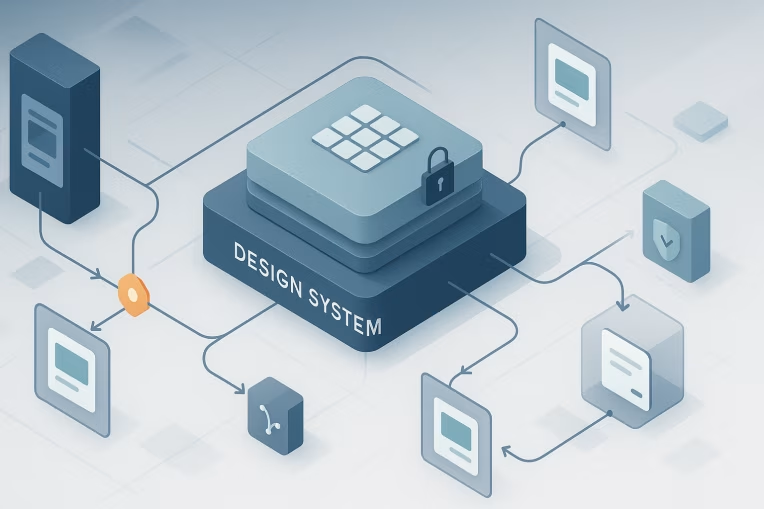
Wrapping is often the most practical middle path between direct adoption and full internal development. The wrapper should do more than rename props. It should create a durable boundary between the external dependency and product teams.
A good wrapper usually provides several forms of control.
Stable internal API
Expose an API that reflects internal design system language, not the external library's naming quirks. This reduces vendor leakage and makes future replacement more manageable.
For example, if an upstream component uses several low-level configuration props to control validation presentation, the wrapper can expose one standardized validation model that matches the rest of the design system.
Token-driven styling boundary
The wrapper should map internal tokens, CSS variables, or theming primitives to the dependency's styling system. The goal is to prevent product teams from reaching directly into the vendor DOM structure whenever they need a visual change.
If teams must depend on undocumented class names, the wrapper is not containing risk effectively.
Accessibility normalization
Wrappers are often the right place to enforce accessible defaults, add required labels or helper associations, normalize focus handling, and document known limitations. They can also prevent unsupported configurations from being used casually.
Behavioral guardrails
A wrapper can remove rarely needed options that create inconsistency or break platform standards. It can also preconfigure patterns like localization, date formats, async loading behavior, or analytics hooks.
This is one of the main reasons wrapper design is a governance activity, not just a coding task.
Test contract
An internal wrapper gives the design system team a stable target for visual, accessibility, and interaction testing. Product teams then test business behavior against the internal contract rather than against every detail of the external package.
That does not eliminate regression risk, but it narrows the change surface when upgrades happen.
When a fork is justified and how to contain it
Forking is expensive because it converts external dependency risk into internal product ownership. Sometimes that is still the right decision.
A fork may be justified when a component is central to the user experience, the upstream project is close but not sufficient, and the organization cannot wait for uncertain external fixes. Rich text editors, advanced data grids, or complex accessibility-sensitive widgets can create this situation.
If a fork is necessary, containment matters.
Set fork entry criteria
Do not fork because a team wants faster customization. Fork only when there is a documented platform-level reason, a meaningful gap analysis, and a credible ownership plan.
Keep the fork behind a wrapper
Even a forked package should not be consumed directly throughout product code. The wrapper remains the contract. This preserves the option to rejoin upstream later or replace the implementation entirely.
Define merge and patch policy
Before adopting the fork, document how upstream changes will be reviewed, how patches will be applied, and who owns release decisions. Without this, forks stagnate quickly.
Minimize divergence deliberately
The more your fork changes architecture, API shape, or styling model, the harder it becomes to maintain. Keep customizations focused on the minimum necessary platform needs.
Assign real ownership
A fork without named maintainers is already a liability. Ownership should include engineering accountability, documentation, testing expectations, and lifecycle review.
Forks are most dangerous when they are treated as temporary even though everyone behaves as if they are permanent.
Review workflow, ownership, and release policy
Governance becomes operational only when the process is clear enough to follow under delivery pressure.
A practical component intake workflow can look like this:
- Request submission with use case, urgency, alternatives considered, and expected usage scope.
- Initial triage by the design system or frontend platform team to determine whether the need is already covered.
- Structured review against accessibility, API fit, theming, performance, security, license, and lifecycle criteria.
- Decision classification as adopt, wrap, fork, or reject.
- Implementation conditions such as required wrapper creation, testing expectations, or limited pilot usage.
- Ownership assignment for upgrades, issue triage, and documentation.
- Release policy definition covering version pinning, update windows, and breaking change handling.
Several operating controls make this model more durable.
Clear ownership model
Every approved dependency should have an owner. That may be the design system team for wrapped components, a platform team for shared infrastructure, or a product team for narrowly scoped adoption. The key is that ownership should not be ambiguous once issues arise.
Version governance
Teams should know whether a dependency is centrally pinned, independently updateable, or released only through design system packages. In monorepo environments, this often benefits from explicit policy so that products do not drift into incompatible patchwork versions.
Approved usage documentation
Approval should describe how the dependency may be used, not only whether it is allowed. For example, a package might be approved only through a wrapper, only for specific use cases, or only after a required accessibility checklist is completed.
Review cadence
Approved packages should still be revisited periodically, especially if they are foundational. Governance is not a one-time gate. It is an ongoing maintenance discipline.
Signals that the intake model is failing
Even well-designed governance models can degrade over time. The warning signs are usually operational before they are architectural.
Watch for patterns such as:
- multiple teams introducing the same dependency independently
- direct vendor imports appearing alongside official wrappers
- repeated accessibility exceptions for the same component category
- styling overrides spreading across applications because the shared component is too rigid or too leaky
- upgrades being postponed because no one knows who owns them
- design system packages becoming thin pass-through layers with no meaningful contract or controls
- teams bypassing intake because the process is too slow or too unclear
These are not just process problems. They indicate that the platform is losing control of its UI foundation.
When that happens, the answer is rarely more policy alone. The intake model usually needs to become faster, more transparent, and more aligned with how teams actually deliver software.
A practical decision model for enterprise teams
For most enterprise design systems, the healthiest default is not "always build" or "always buy." It is evaluate deliberately, abstract where needed, and assign ownership early.
In practical terms:
- adopt directly only when the dependency is low risk and low surface area
- wrap by default for meaningful shared UI behavior
- fork only with explicit platform justification and real maintenance commitment
- reject when the long-term cost is visible upfront
This approach helps design system teams stay pragmatic without becoming permissive by accident. It also creates a common language for architects, platform teams, and product teams to discuss tradeoffs in a consistent way.
Third-party components can accelerate delivery. They can also quietly hard-code someone else's priorities into your platform. A good intake governance model makes that tradeoff visible before it becomes expensive, and gives the organization a repeatable way to protect accessibility, maintainability, and design system integrity at scale. Teams that have already had to standardize shared UI patterns and governance across brands, such as in Arvesta, often learn this lesson quickly.
Tags: third-party component governance, enterprise design systems, component intake process, UI dependency governance, design system architecture, frontend platform governance